
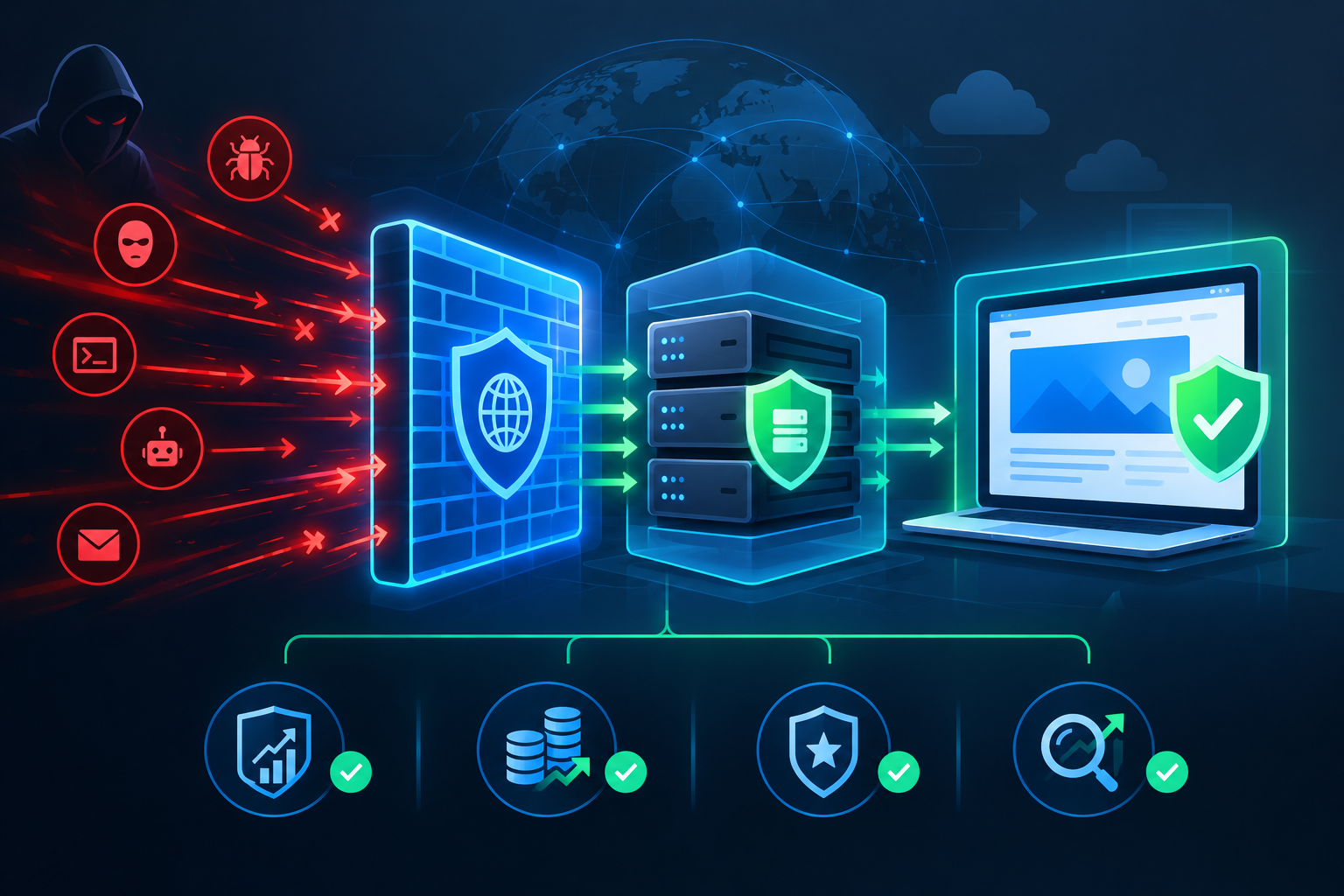
A hacked website doesn’t just disrupt your traffic—it can drain your revenue, damage your reputation, and drop your search rankings overnight. Without strong platform-level hardening, your site stays vulnerable to persistent threats that slip past basic defenses. This post explains how an enterprise web application firewall, origin server protection, and other measures work together to keep your web infrastructure safe and your business intact.
Understanding the Real Cost of Compromised Web Infrastructure
When attackers breach your web infrastructure, the damage extends far beyond the initial intrusion. Your customers lose confidence in your brand. Search engines penalize your rankings. Revenue streams dry up as visitors abandon your site. The financial impact compounds daily while you scramble to restore normal operations.
Business owners often underestimate how quickly a security incident can escalate. A single vulnerability in your web application can expose customer data, inject malicious code into your pages, and turn your legitimate website into a distribution point for malware. Search engines detect these changes within hours and immediately flag your site as dangerous. The result is a dramatic drop in organic traffic precisely when you need visibility most.
The cost of recovery goes beyond technical repairs. You must invest time and resources into malware cleanup and recovery, communicate with affected customers, and rebuild trust that took years to establish. Legal and compliance issues may arise if customer data was compromised. Your team must work around the clock to restore services while normal business operations grind to a halt.
The Strategic Role of an Enterprise Web Application Firewall
An enterprise web application firewall serves as your first line of defense against sophisticated attacks targeting your web applications. Unlike traditional network firewalls that operate at the network layer, a web application firewall inspects HTTP and HTTPS traffic to identify and block malicious requests before they reach your application code.
Modern web applications face threats that evolve constantly. SQL injection attacks attempt to manipulate your database queries. Cross-site scripting tries to inject malicious scripts into pages served to your users. Credential stuffing attacks use stolen username and password combinations to gain unauthorized access. An enterprise web application firewall recognizes these attack patterns and stops them in real time.
The enterprise-grade distinction matters because business-critical applications require protection that scales with your traffic and adapts to emerging threats. Enterprise solutions offer centralized management across multiple applications, detailed logging and analytics, and the ability to create custom rules tailored to your specific security requirements. You gain visibility into attack trends and can proactively strengthen defenses before new vulnerabilities are exploited.
Deployment flexibility is another key advantage. You can implement an enterprise web application firewall as a cloud-based service, an on-premises appliance, or a hybrid solution that combines both approaches. Cloud-based deployment offers rapid implementation and automatic updates, while on-premises solutions give you complete control over sensitive data flows. The choice depends on your infrastructure architecture and compliance requirements.
Implementing Comprehensive Website Security and Monitoring
Protection requires continuous vigilance. Website security and monitoring systems work together to detect threats, alert your team, and provide the data needed to respond effectively. Monitoring extends beyond simple uptime checks to include file integrity verification, malware scanning, and behavioral analysis that identifies suspicious activity patterns.
File integrity monitoring detects unauthorized changes to your website files. Attackers often modify core application files, inject backdoors into plugins, or alter configuration files to maintain persistent access. By maintaining cryptographic hashes of known-good files and comparing them regularly, you can identify compromises within minutes of occurrence rather than discovering them weeks later through customer complaints.
Behavioral monitoring establishes baselines for normal traffic patterns and application behavior. When activity deviates from these baselines, automated alerts notify your security team. Unusual login attempts from unfamiliar geographic locations, unexpected spikes in database queries, or abnormal outbound network connections all signal potential security incidents that require immediate investigation.
Log aggregation and analysis provide the evidence trail needed to understand how breaches occur and what data was accessed. Comprehensive website security and monitoring collects logs from web servers, application servers, databases, and security tools into a centralized platform where correlation rules can identify complex attack sequences that individual log sources might miss.
Real-time alerting ensures that your team can respond before minor incidents become major breaches. Configure alerts based on severity levels, with critical events triggering immediate notifications through multiple channels. Your monitoring system should integrate with incident response workflows so that alerts automatically create tickets, notify on-call personnel, and initiate predefined response procedures.
How to Harden Web Server Security at the Platform Level
The foundation of web infrastructure protection lies in how you harden web server security through systematic configuration and ongoing maintenance. Default server configurations prioritize ease of use over security, leaving unnecessary services running, weak encryption enabled, and verbose error messages that reveal system details to attackers.
Start by removing or disabling all unnecessary services and modules. Every additional component increases your attack surface. If your application doesn’t require a particular module, remove it entirely rather than simply disabling it. This principle of minimal installation reduces the number of potential vulnerabilities that could be exploited.
Configure strong encryption for all data in transit. Modern TLS configurations should disable outdated protocols like SSL 3.0 and TLS 1.0, enforce strong cipher suites, and implement perfect forward secrecy. Regular updates to your encryption configuration ensure compatibility with current security standards while protecting against newly discovered protocol weaknesses.
Access controls determine who can connect to your servers and what actions they can perform. Implement principle of least privilege across all accounts and services. Application processes should run under dedicated service accounts with only the permissions required for their specific functions. Administrative access should require multi-factor authentication and be restricted to specific IP addresses or VPN connections.
Security headers provide instructions to browsers that prevent common client-side attacks. Content Security Policy headers restrict which resources browsers will load, preventing cross-site scripting attacks. HTTP Strict Transport Security forces browsers to use encrypted connections. X-Frame-Options prevents clickjacking attacks. These headers cost nothing to implement but provide significant protection against entire categories of threats.
Regular patching and updates address known vulnerabilities before attackers can exploit them. Establish a systematic patch management process that tests updates in non-production environments before deploying to production systems. Subscribe to security mailing lists for all software components in your stack so you receive immediate notification of critical vulnerabilities.
Protecting Your Infrastructure with Origin Server Protection
Origin server protection shields your actual web servers from direct internet exposure. By placing protective layers between users and your origin servers, you prevent attackers from directly targeting your infrastructure while maintaining normal service for legitimate users.
Content delivery networks with built-in security features provide one form of origin server protection. All user requests route through the CDN’s edge servers, which cache content and filter malicious traffic before it reaches your origin. Your origin servers only accept connections from the CDN’s IP addresses, making it extremely difficult for attackers to bypass protective filters and attack directly.
This architecture provides multiple benefits beyond security. Geographic distribution of edge servers reduces latency for users worldwide. Caching reduces load on your origin servers, improving performance and reducing infrastructure costs. DDoS mitigation happens at the edge, where massive attack traffic can be absorbed without affecting your origin capacity.
IP whitelisting ensures that your origin servers only accept connections from known, trusted sources. Configure your firewall rules to reject all traffic except from your CDN provider’s IP ranges, your office networks, and any other legitimate sources. Attackers who discover your origin IP address find that direct connections are blocked at the network level.
Rate limiting at the origin provides an additional safety mechanism if protective layers are bypassed. Configure limits on requests per IP address, concurrent connections, and request rates to specific endpoints. These limits prevent resource exhaustion attacks and slow down automated scanning and exploitation attempts.
Geographic restrictions can block traffic from regions where you have no legitimate users or business operations. If your business operates exclusively in North America but you see attack traffic originating from other continents, geographic blocking provides a simple way to reduce exposure without affecting real customers.
Malware Cleanup and Recovery After a Security Incident
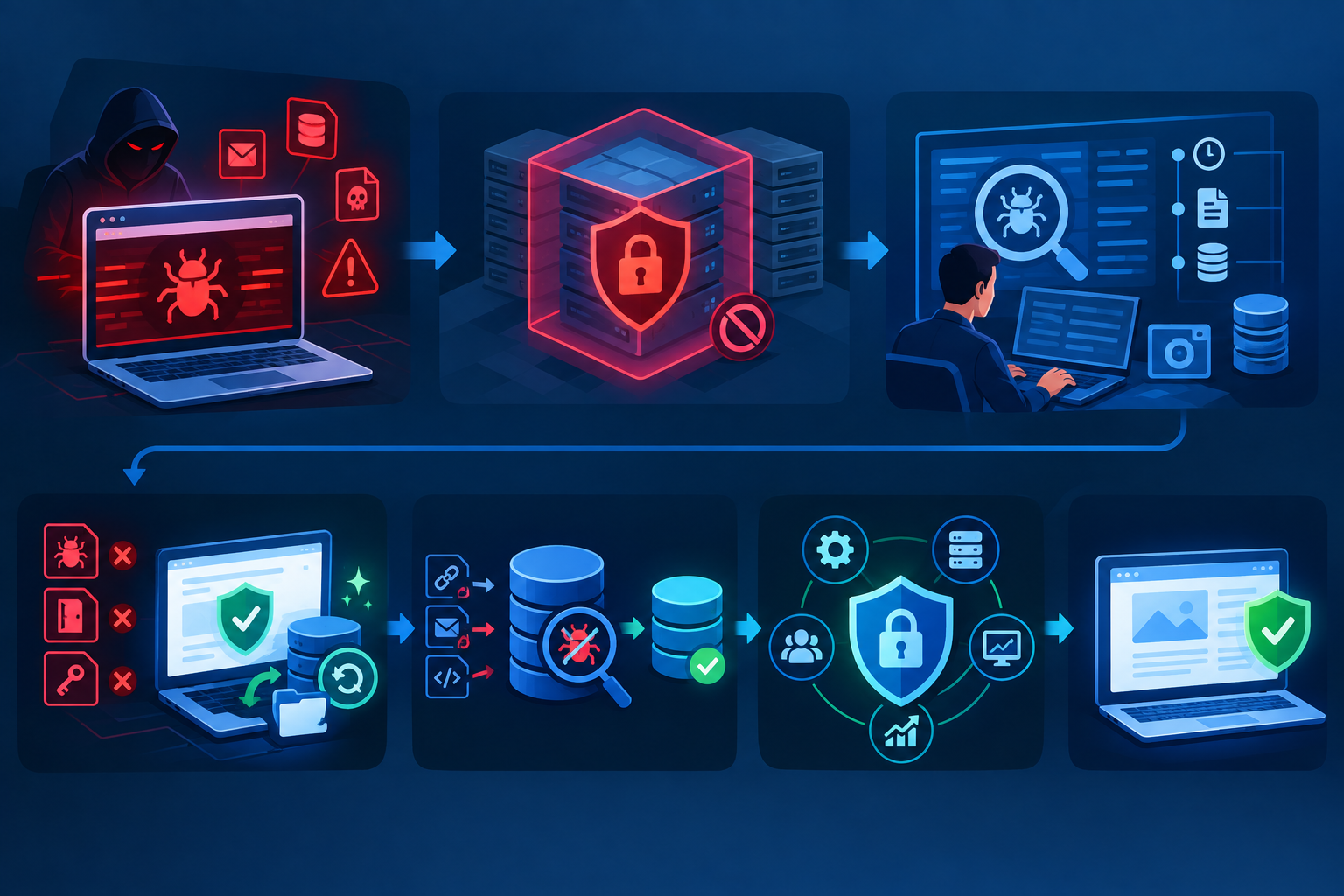
Despite best efforts at prevention, some organizations will face security incidents requiring thorough malware cleanup and recovery procedures. The speed and completeness of your response determines how quickly you can restore normal operations and minimize lasting damage.
Immediate containment prevents ongoing damage and data exfiltration. As soon as you confirm a compromise, isolate affected systems from your network. This might mean taking your website offline temporarily, but allowing a compromised site to continue operating while attackers maintain access causes far greater harm.
Forensic analysis identifies what happened, when it occurred, and what data or systems were affected. Preserve logs and system snapshots before beginning cleanup so you can conduct a thorough investigation. Understanding the attack vector helps you close the vulnerability that allowed the breach and provides information required for customer notifications and regulatory reporting.
Complete malware removal requires more than deleting obvious malicious files. Attackers typically install multiple backdoors and persistence mechanisms. Restore all application files from known-good backups rather than attempting to selectively remove malicious code. Change all passwords and API keys, revoke compromised credentials, and rotate encryption keys that may have been exposed.
Database sanitization removes malicious content injected into your data. Attackers often inject spam links, phishing pages, or malware distribution code into database fields that are displayed on your website. Review database contents for unauthorized modifications and restore from clean backups when possible.
Security hardening after an incident addresses the vulnerabilities that allowed the breach. Apply all available security patches, review and strengthen access controls, implement additional monitoring, and consider architectural changes that reduce future risk. Each incident provides lessons that should result in measurable security improvements.
Navigating Google Penalty Removal After Hack
When search engines detect that your website has been compromised, they protect users by flagging your site as dangerous or removing it from search results entirely. Google penalty removal after hack requires specific steps to demonstrate that you have fully addressed the security issues and that your site is safe for users.
Google Search Console provides the primary communication channel with Google about security issues affecting your site. When Google detects a compromise, you receive notifications through Search Console detailing what was found and which pages are affected. Review these reports carefully to understand the full scope of the problem from Google’s perspective.
Complete remediation must address every issue Google identified. Simply removing visible malware is not sufficient if backdoors remain that could allow reinfection. Google’s review process checks whether the underlying vulnerabilities have been fixed, not just whether the current malware has been removed.
The reconsideration request process begins after you have completed cleanup and verified that all security issues have been resolved. Through Search Console, submit a reconsideration request that explains what happened, what you found during your investigation, and what steps you took to remediate the issues and prevent recurrence. Provide specific details rather than generic statements.
Response times vary depending on the severity of the compromise and the completeness of your remediation. Simple hacks might be reviewed within days, while complex compromises affecting many pages could take weeks. During this period, maintain your security improvements and monitor for any signs of reinfection.
Prevention of future penalties requires ongoing commitment to security. Google penalty removal after hack is not a one-time event but rather a signal that your security posture needs fundamental improvement. Implement the protective measures discussed in this article to demonstrate to search engines that you take security seriously.
Building a Comprehensive Security Strategy
Effective web infrastructure protection requires multiple layers working together. No single security control provides complete protection, but a comprehensive strategy creates defense in depth that makes successful attacks extremely difficult.
Your enterprise web application firewall blocks attacks targeting application vulnerabilities. Origin server protection prevents direct attacks on your infrastructure. Hardened server configurations eliminate common vulnerabilities. Continuous website security and monitoring detect threats that bypass other controls. Regular testing and updates keep all protective layers effective against evolving threats.
Assign clear ownership for each aspect of your security program. Someone must be responsible for reviewing firewall logs, applying security patches, responding to monitoring alerts, and conducting regular security assessments. Security cannot be an afterthought or something handled when time permits. It requires dedicated resources and executive support.
Documentation ensures consistency and enables effective incident response. Document your security architecture, configuration standards, monitoring procedures, and incident response playbooks. When an incident occurs, your team needs immediate access to information about how systems are configured and what steps to take.
Testing validates that your security controls work as intended. Conduct regular vulnerability scans to identify configuration weaknesses or missing patches. Perform penetration testing to simulate real-world attacks and identify gaps in your defenses. Test your incident response procedures through tabletop exercises and simulated breaches.
The Business Case for Proactive Web Infrastructure Protection
Investing in comprehensive web infrastructure security delivers measurable business value that extends far beyond avoiding the costs of a breach. Strong security enables business growth by building customer trust, supporting compliance requirements, and providing the stable foundation needed for digital initiatives.
Customer trust is difficult to build and easy to destroy. When customers know that you take their security seriously, they feel confident sharing their information and conducting transactions on your platform. Security certifications, transparent security practices, and a track record of protecting customer data differentiate your business from competitors who treat security as an afterthought.
Compliance requirements increasingly mandate specific security controls. Whether you must comply with PCI DSS for payment card processing, HIPAA for healthcare information, GDPR for European customer data, or industry-specific regulations, implementing strong security controls helps you meet these obligations and avoid costly penalties.
Operational stability improves when your infrastructure is protected from attacks that cause outages and performance degradation. Your team can focus on building features and improving services rather than constantly responding to security incidents. Planned maintenance and improvements replace the chaos of emergency response.
Insurance and liability considerations favor organizations with strong security programs. Cyber insurance premiums reflect your security posture, with better-protected organizations paying lower rates. In the event of a breach, demonstrating that you implemented reasonable security controls can limit liability and reduce the risk of regulatory penalties.
Taking Action to Protect Your Web Infrastructure
The threats facing your web infrastructure are real and growing. Attackers constantly probe for vulnerabilities, and the consequences of a successful breach extend far beyond immediate technical damage. Your revenue, reputation, and search engine visibility all depend on maintaining strong security.
Begin by assessing your current security posture. Where are your vulnerabilities? What protective controls do you have in place? What gaps exist that leave you exposed to common attack vectors? An honest assessment provides the foundation for improvement.
Prioritize improvements based on risk and impact. Not every security enhancement can be implemented simultaneously, but you can systematically address the most critical vulnerabilities first. Focus on controls that protect against the most likely and most damaging threats to your specific business.
Partner with experienced security professionals who can provide expertise your internal team may lack. Web infrastructure security requires specialized knowledge that takes years to develop. Working with trusted advisors accelerates your security improvements and helps you avoid costly mistakes.
Commit to ongoing security as a business priority rather than a one-time project. Threats evolve constantly, and your defenses must evolve with them. Regular reviews, updates, and improvements ensure that your security posture keeps pace with changing risks.
Your web infrastructure supports your entire digital business. Protecting it through enterprise web application firewalls, origin server protection, hardened configurations, and comprehensive monitoring is not optional. It is the foundation on which sustainable business success is built. The investment you make in security today prevents the far greater costs of recovery, lost revenue, and damaged reputation that follow a successful attack.
Frequently Asked Questions
What is an enterprise web application firewall and why do I need one?
An enterprise web application firewall inspects HTTP and HTTPS traffic to identify and block attacks targeting your web applications before they reach your servers. Unlike basic firewalls that only filter network traffic, it understands application-layer threats like SQL injection and cross-site scripting. You need one because web applications face constantly evolving threats that can compromise customer data, inject malware, and damage your business reputation.
How long does Google penalty removal after hack typically take?
Google penalty removal after hack usually takes anywhere from a few days to several weeks, depending on the severity of the compromise and how thoroughly you address the underlying security issues. Simple hacks affecting few pages may be reviewed quickly, while complex compromises require more extensive review. The key is demonstrating through Google Search Console that you have completely remediated all security issues and implemented measures to prevent recurrence.
What does it mean to harden web server security?
To harden web server security means systematically configuring your servers to minimize vulnerabilities and reduce attack surface. This includes removing unnecessary services, configuring strong encryption, implementing strict access controls, adding security headers, and maintaining current security patches. Hardening transforms default server configurations that prioritize convenience into secure configurations that prioritize protection.
How does origin server protection differ from a standard firewall?
Origin server protection shields your actual web servers from direct internet exposure by routing all traffic through protective layers like content delivery networks with security features. Standard firewalls filter traffic but your servers remain directly accessible. With origin server protection, your origin only accepts connections from trusted sources, making it nearly impossible for attackers to bypass protective filters and directly target your infrastructure.
What should I do immediately after discovering my website has been hacked?
Immediately isolate compromised systems from your network to prevent ongoing damage and data theft. Preserve logs and system snapshots for forensic analysis. Begin thorough malware cleanup and recovery by restoring files from known-good backups, changing all passwords and credentials, and identifying how the breach occurred. Contact your security team or external experts to ensure complete remediation before bringing systems back online.
How Elevated Marketing can help
We do this work every day for businesses in Indianapolis, the DC & Virginia metro, and nationwide.
→ Website Security & Monitoring→ SEO & GEO Services→ Managed Web Hosting→ More on UncategorizedGet a free audit