
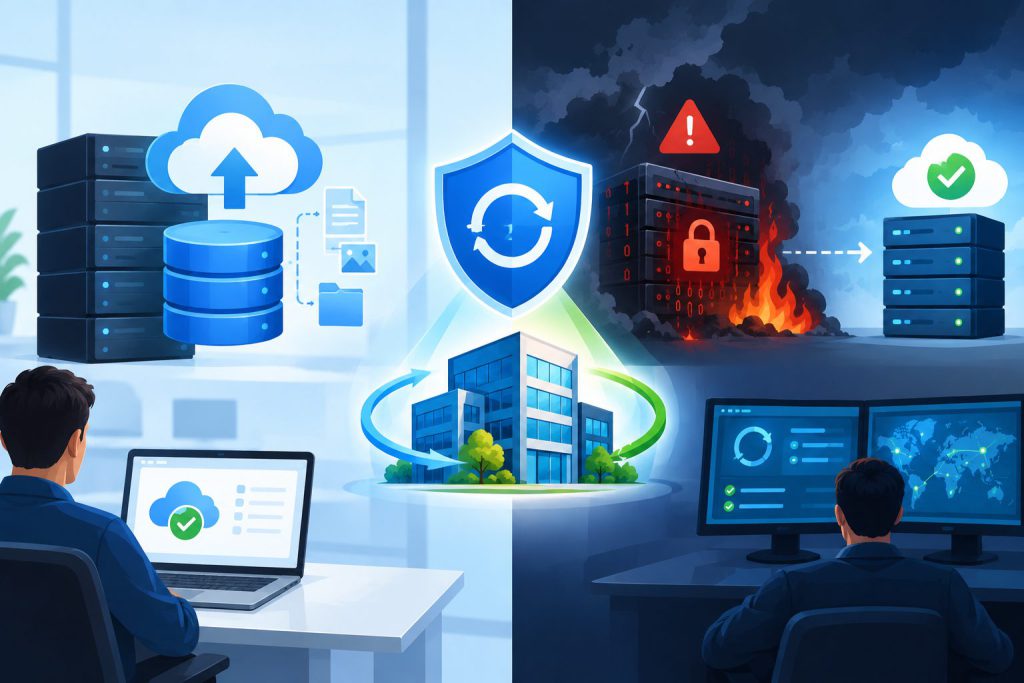
Most companies treat backups as a safety net, but that’s only half the story when it comes to business continuity. When ransomware strikes or a server fails, a basic backup won’t get you fully operational fast enough. Understanding the difference between a disaster recovery vs backup strategy could be the key to keeping your business running without costly downtime. Let’s break down why enterprise data backup vs disaster recovery demands two very different approaches.
Understanding the Fundamental Distinction
The confusion between backups and disaster recovery represents one of the most significant gaps in modern business continuity planning. While both protect your data, they serve distinctly different purposes in your overall security architecture.
What Standard Backups Actually Provide
A backup creates copies of your data at specific points in time. Your IT team schedules these snapshots daily, weekly, or continuously, depending on your organization’s needs. These copies live on separate storage media, whether that’s tape drives, external hard drives, or cloud storage platforms.
Backups answer a simple question: “Can we retrieve lost data?” When an employee accidentally deletes a critical file or a database becomes corrupted, backups provide the raw materials needed for restoration. This process focuses purely on data preservation.
The True Scope of Disaster Recovery
Disaster recovery extends far beyond data retrieval. A comprehensive disaster recovery vs backup strategy addresses the complete restoration of business operations. This means recovering not just files, but entire systems, applications, configurations, and the infrastructure that keeps your business running.
When evaluating enterprise data backup vs disaster recovery, consider this scenario: Your primary server goes down due to a ransomware attack. A backup gives you the data files. Disaster recovery gives you a fully operational replacement environment where employees can continue working within minutes, not days.
Why Recovery Time Objectives Matter More Than You Think
The speed at which your business returns to normal operations directly impacts your bottom line. Every hour of downtime costs mid-market companies an average of $100,000 in lost revenue, damaged reputation, and decreased productivity.
Backup Restoration Timeframes
Traditional backup restoration follows a linear process. Your IT team must locate the correct backup media, verify its integrity, provision new hardware or virtual machines, reinstall operating systems and applications, restore the data, reconfigure settings, and test functionality before bringing systems back online.
This process typically requires 24 to 72 hours for critical systems. For businesses in competitive markets, this delay can mean losing customers to competitors who remained operational.
Disaster Recovery Speed Advantages
Business continuity and disaster recovery solutions prioritize rapid restoration through pre-configured environments. Instead of rebuilding from scratch, disaster recovery platforms maintain ready-to-activate replicas of your production systems.
When disaster strikes, your team activates these replicas, redirects network traffic, and resumes operations. This approach reduces recovery time from days to minutes or hours, preserving customer relationships and revenue streams.
The Ransomware Reality: Why Backups Alone Fail
Ransomware attacks have evolved beyond simple file encryption. Modern ransomware variants specifically target backup systems, understanding that businesses rely on these as their primary defense.
How Attackers Compromise Backup Systems
Sophisticated ransomware now includes reconnaissance phases where attackers map your network, identify backup locations, and establish persistent access before launching the encryption payload. They encrypt or delete your backups first, then lock your production data.
When your backup system shares network access with production systems, attackers exploit this connection. Even air-gapped backups face risks if the gap isn’t maintained consistently during backup windows.
Ransomware Disaster Recovery Planning Requirements
Effective ransomware disaster recovery planning requires isolated recovery environments that attackers cannot reach from your production network. This isolation ensures that even if ransomware compromises your entire primary infrastructure, your recovery capability remains intact.
An offsite disaster recovery replica provides this isolation naturally. By maintaining your recovery environment in a separate geographic location with independent network access, you create a sanctuary that ransomware cannot touch. When attackers encrypt your primary systems, you switch operations to the replica while cleaning the compromised environment.
Architectural Differences That Define Success
The technical architecture underlying backups and disaster recovery reveals why one cannot substitute for the other in a comprehensive protection strategy.
Backup Architecture Limitations
Standard backup systems operate on a schedule-based model. They capture data states at predetermined intervals, creating gaps between backup windows. Any work completed between backups remains vulnerable to permanent loss.
Backup storage typically optimizes for capacity rather than performance. Compression and deduplication reduce storage costs but increase restoration time. The systems prioritize efficient long-term data retention over rapid accessibility.
Disaster Recovery Infrastructure Design
Disaster recovery platforms maintain near-real-time synchronization with production systems. Continuous data replication captures changes as they occur, minimizing data loss to seconds or minutes rather than hours.
The infrastructure emphasizes immediate accessibility. Recovery systems use high-performance storage and maintain active compute resources ready for instant activation. This readiness comes at a higher cost but delivers the speed that business continuity demands.
Building a Layered Protection Strategy
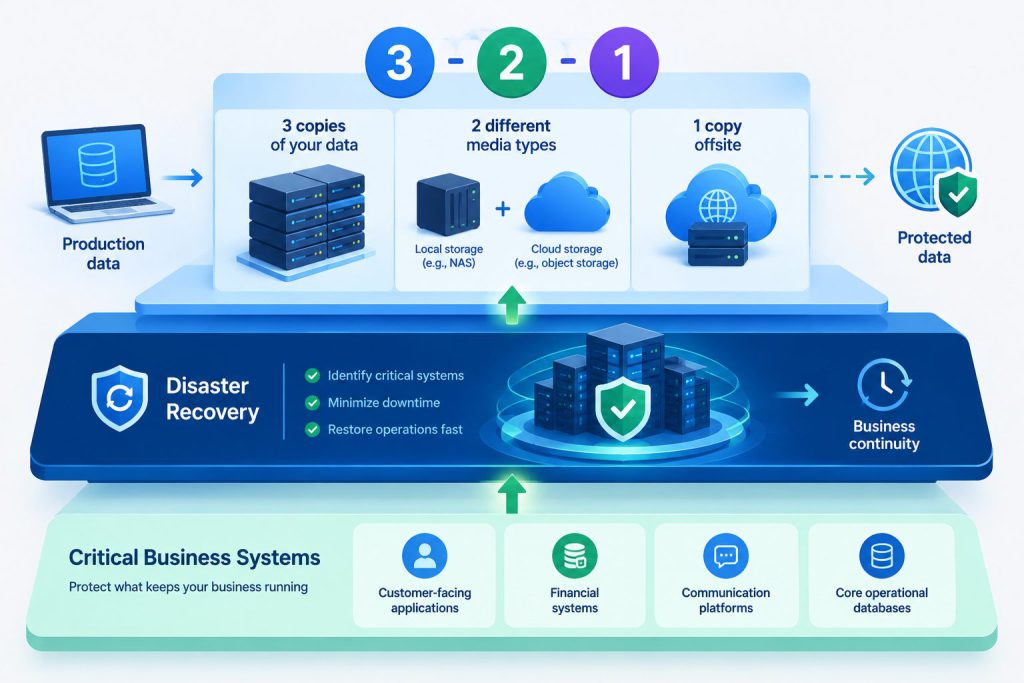
The most resilient organizations recognize that enterprise data backup vs disaster recovery isn’t an either-or decision. Both components serve essential roles in a comprehensive protection framework.
The 3-2-1 Backup Rule Foundation
Professional backup strategies follow the 3-2-1 rule: maintain three copies of data, store them on two different media types, and keep one copy offsite. This approach protects against various failure scenarios, from hardware malfunction to site-wide disasters.
Your primary data resides on production systems. The first backup copy might live on a network-attached storage device for quick local recovery. The second backup copy should exist in a different format, perhaps cloud storage, providing redundancy if the primary backup method fails.
Layering Disaster Recovery Capabilities
On top of this backup foundation, add disaster recovery capabilities for systems that cannot tolerate extended downtime. Identify your critical applications and infrastructure components. What systems must remain operational for your business to function?
Customer-facing applications, financial systems, communication platforms, and core operational databases typically qualify as critical. These systems deserve the enhanced protection that business continuity and disaster recovery solutions provide.
Testing: The Overlooked Critical Component
Both backups and disaster recovery plans fail in production environments when organizations neglect regular testing. Your protection strategy only works if you verify its functionality before an actual disaster occurs.
Backup Testing Protocols
Schedule regular restoration tests for your backup systems. Don’t just verify that backups complete successfully. Actually restore data to a test environment and confirm that files open correctly, databases function properly, and applications run as expected.
Test different scenarios: single file restoration, complete database recovery, and full system rebuilds. Document the time required for each process. These metrics inform your recovery time objectives and help set realistic expectations with business stakeholders.
Disaster Recovery Validation
Disaster recovery testing requires more extensive exercises. Conduct failover tests where you actually switch operations to your recovery environment. Monitor application performance, verify that all integrations function correctly, and confirm that users can access required systems.
Test failback procedures as well. After activating your disaster recovery environment, you eventually need to return to normal operations. The failback process carries its own risks and requires validated procedures.
Cost Considerations and ROI Analysis
Budget constraints force IT directors and risk managers to justify every expenditure. Understanding the financial implications of disaster recovery vs backup strategy helps build compelling business cases.
Backup System Economics
Backup solutions represent relatively modest investments. Cloud backup services charge based on storage consumption, typically ranging from $5 to $30 per terabyte monthly. On-premises backup infrastructure requires upfront hardware investment but offers predictable long-term costs.
The primary cost comes from storage capacity. As data volumes grow, backup storage requirements increase proportionally. Retention policies that keep multiple versions of files across extended timeframes multiply storage needs.
Disaster Recovery Investment Structure
Business continuity and disaster recovery solutions command higher budgets due to their complexity and resource requirements. Maintaining duplicate infrastructure, whether physical or virtual, means paying for compute resources, storage, network capacity, and software licenses for systems that sit idle until needed.
Cloud-based disaster recovery services offer more flexible pricing models. You pay lower rates for standby capacity and higher rates only when activating recovery systems. This approach reduces costs while maintaining readiness.
Calculating Downtime Costs
To determine appropriate investment levels, calculate your organization’s downtime costs. Multiply your hourly revenue by the percentage that depends on IT systems. Add productivity losses, customer churn rates, and potential regulatory penalties.
If one hour of downtime costs $50,000, and disaster recovery reduces recovery time from 48 hours to 2 hours, the solution prevents $2.3 million in losses during a single incident. This calculation typically justifies even substantial disaster recovery investments.
Compliance and Regulatory Requirements
Many industries face regulatory requirements that explicitly mandate specific backup and disaster recovery capabilities. Understanding these obligations helps prioritize protection investments.
Data Retention Mandates
Financial services, healthcare, and legal industries face strict data retention requirements. Regulations specify how long organizations must preserve records and maintain the ability to retrieve them. Backup systems provide the long-term retention capabilities these regulations demand.
Your backup strategy must account for retention periods ranging from months to decades, depending on data types. Immutable backups that prevent modification or deletion help satisfy regulatory requirements while protecting against ransomware.
Business Continuity Standards
Regulatory frameworks increasingly require organizations to demonstrate business continuity capabilities. They expect companies to maintain operations during disruptions, protecting customer interests and market stability.
Disaster recovery plans document how your organization will continue critical functions during various disaster scenarios. Regulators often require evidence of regular testing and validation. An offsite disaster recovery replica provides tangible proof of your continuity capabilities.
Selecting the Right Solutions for Your Organization
With clear understanding of enterprise data backup vs disaster recovery, you can make informed decisions about appropriate solutions for your specific needs.
Assessing Your Risk Profile
Start by evaluating your organization’s risk exposure. What threats pose the greatest danger to your operations? Ransomware, hardware failure, natural disasters, and human error each require different protection approaches.
Consider your industry’s threat landscape. Healthcare organizations face constant ransomware pressure. Manufacturing companies worry about equipment failure and supply chain disruptions. Professional services firms fear data loss and client confidentiality breaches.
Defining Recovery Objectives
Establish clear recovery time objectives (RTO) and recovery point objectives (RPO) for each critical system. RTO specifies how quickly you must restore functionality. RPO defines the maximum acceptable data loss measured in time.
A financial trading platform might require an RTO of minutes and an RPO of seconds. A document management system might tolerate an RTO of 24 hours and an RPO of one day. These objectives determine whether backup alone suffices or disaster recovery becomes necessary.
Vendor Evaluation Criteria
When selecting backup and disaster recovery providers, prioritize vendors who demonstrate deep technical expertise and proven track records. Request customer references from organizations similar to yours in size and industry.
Evaluate the vendor’s security practices. Your backup and disaster recovery systems become attractive targets for attackers seeking to compromise your last line of defense. Ensure vendors employ encryption, multi-factor authentication, and rigorous access controls.
Integration with Broader Security Strategies
Your protection strategy should connect seamlessly with other security initiatives, creating a comprehensive defense framework.
Endpoint Detection and Response
Modern endpoint detection and response (EDR) solutions identify ransomware and other threats before they can spread throughout your network. When EDR systems detect suspicious activity, they can trigger automated responses, including initiating backup snapshots or preparing disaster recovery environments for potential activation.
This integration between threat detection and recovery systems reduces response time and limits damage. Instead of waiting for manual intervention, your systems automatically take protective action.
Security Information and Event Management
Security information and event management (SIEM) platforms collect and analyze logs from across your infrastructure. By incorporating backup and disaster recovery systems into SIEM monitoring, you gain visibility into potential compromises of your protection mechanisms.
Alerts trigger when unauthorized users access backup systems, when backup jobs fail repeatedly, or when unusual data access patterns emerge. This visibility helps you defend your defenses, ensuring that protection systems remain secure.
The Path Forward: Building Resilience
Organizations that treat disaster recovery vs backup strategy as complementary rather than competing priorities build the resilience needed for long-term success. Your backup systems preserve data across time, providing the foundation for recovery. Your disaster recovery capabilities deliver the speed and completeness that business continuity demands.
Start by assessing your current capabilities honestly. Test your existing backups and measure actual restoration times. Identify critical systems that cannot tolerate extended downtime. Calculate the financial impact of various outage scenarios.
Use these insights to build a phased approach. Strengthen backup practices first, ensuring reliable data preservation across all systems. Then layer disaster recovery capabilities onto the most critical applications, gradually expanding coverage as budget allows.
Remember that ransomware disaster recovery planning requires particular attention in today’s threat environment. Attackers specifically target backup systems, understanding that compromising backups increases the likelihood of ransom payment. Your recovery capabilities must remain isolated and protected from the threats that might compromise production systems.
The investment in comprehensive backup and disaster recovery capabilities pays dividends not just during disasters but in daily operations. Knowing that your organization can survive and quickly recover from any disruption provides confidence to pursue growth opportunities, enter new markets, and take calculated risks that drive competitive advantage.
Your customers, partners, and stakeholders expect reliability. They depend on your ability to deliver consistent service regardless of circumstances. By implementing both rigorous backup practices and rapid disaster recovery capabilities, you demonstrate the operational maturity and risk management sophistication that builds trust and enables lasting business relationships.
The question isn’t whether to invest in enterprise data backup vs disaster recovery, but how to properly balance both within your overall business continuity framework. Each serves distinct purposes, and together they create the comprehensive protection that modern businesses require to thrive in an environment of constant threats and unpredictable challenges.
Frequently Asked Questions
What is the main difference between backup and disaster recovery?
Backups create copies of your data at specific points in time, allowing you to retrieve lost files or information. Disaster recovery provides complete system restoration, including applications, configurations, and infrastructure, enabling your entire business to resume operations quickly after a major disruption. While backups focus on data preservation, disaster recovery prioritizes operational continuity.
How long does it typically take to recover from a disaster using only backups?
Traditional backup restoration typically requires 24 to 72 hours for critical systems. This timeframe includes locating backup media, provisioning new hardware, reinstalling operating systems and applications, restoring data, reconfiguring settings, and testing functionality. Business continuity and disaster recovery solutions reduce this recovery time to minutes or hours through pre-configured environments.
Why don’t backups protect against ransomware attacks?
Modern ransomware specifically targets backup systems during reconnaissance phases before encrypting production data. Attackers identify backup locations and establish access to compromise them first, eliminating your recovery options. Effective ransomware disaster recovery planning requires isolated recovery environments that attackers cannot reach from your production network, such as an offsite disaster recovery replica.
What is an RTO and RPO, and why do they matter?
Recovery Time Objective (RTO) specifies how quickly you must restore system functionality after a disruption. Recovery Point Objective (RPO) defines the maximum acceptable data loss measured in time between backups. These metrics determine whether standard backups meet your needs or whether you require disaster recovery capabilities. Systems with low RTO and RPO requirements need more sophisticated protection strategies.
Should my organization invest in both backup and disaster recovery?
Most organizations benefit from both backup and disaster recovery capabilities working together. Backups provide cost-effective data preservation for all systems and long-term retention for compliance. Disaster recovery delivers rapid restoration for critical systems that cannot tolerate extended downtime. This layered approach creates comprehensive protection that addresses both data loss and business continuity requirements.
How Elevated Marketing can help
We do this work every day for businesses in Indianapolis, the DC & Virginia metro, and nationwide.
→ Website Security & Monitoring→ SEO & GEO Services→ Managed Web Hosting→ More on UncategorizedGet a free audit